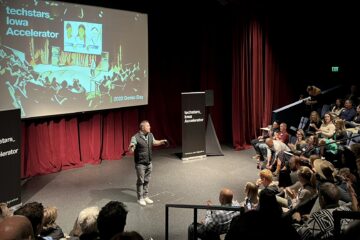
Slide Deck Design

Ready to inspire an audience? Maybe you’re looking to host a meaningful meeting? Let’s explore translating your transmission with a supportive slide deck.

Before we dive in, why are slides needed? Building a slide deck highlights your key points while establishing the tone, cadence, and flow for your storytelling. Think of a slide deck as the visualization of a story, which supports what you say when expressed in a natural way. The unconscious objective is to deliver impact in the least amount of time.

There are endless templates that will help you format the look of a slide deck, but find creative ways to make it your own. You can customize your slide deck with colors that match your brand, icons, and other graphics that add character beyond the status quo.

When every slide matters, it’s tempting to overload slides with too much text. This is a common mistake, but if the audience is tasked with reading, they’re unable to listen. One hack is to remove punctuation. This eliminates paragraphs, full sentences, and lengthy bullet points. Good storytelling, short titles, eye-catching images, and concise key phrases are all you need to guide the audience.

Make your slide deck stand out with bold imagery and less text coupled with simple transitions and creative movement of the content on each slide. Subtle animations will keep your audience curious, while graphs, charts, and other data visualizations keep things informative and easy to digest.

As content comes to life, include specific details related to any themes, goals, or requirements. For example, pitch competition judges often use a rubric to score each participant. Creatively addressing these details will answer questions before they become a distraction.

As you bring a presentation to a close, design the final slide with intention. The last slide is often on screen longer than any others, so combine heroic imagery, branding, calls to action, and simple contact information to finish in style.

Extra Shot

Pitches are built to impress.

Presentations are meant to share.

After you glide through your impressive slide deck, are questions allowed? If so, consider including back slides. Back slides live behind the final slide. They are used to highlight material not included in the main presentation. Handy back slides include detailed pricing, competitive analysis, marketing strategies, research data, testing results, and intricate financial information. People who understand what they’re talking about use fewer words and optional back slides allow you to simplify your storytelling. This reduces the numbing effect of information overload.

With back slides in place, you can be more concise. This makes for a more impactful tone. It can even be good to purposefully leave out a curious topic from the main presentation. When the inevitable question is asked, you can use the sneaky back slide to share a focused response. If your presentation includes back slides, memorize their order and you’ll soon be leading a more authoritative exchange. In short, back slides prove you’re a pro.

Extra Shot

When your story and slide deck resonate, the audience nods, laughs, asks questions, and takes action to connect with fellow attendees.

Being prepared is obviously important when all eyes are on you. With a striking slide deck in place, practice what you plan to say and sync the narrative to the timing of each slide. Whether you use animated content or not, it’s best to have a single click to move between each slide. As you speak, you should focus on connecting with the audience, not on the slide deck or the handheld clicker.

Memorization is also a trap. A more genuine tone comes from the heart. We’ve all seen people lose their place in a memorized script or fumble through notecards. Avoid this by practicing what you plan to say out loud. Memorize the order of your slides but not exactly what you plan to say.

As you practice, move around and find ways to keep track of where you’re at without reading from the slides. Further challenge yourself by introducing distractions. A small audience throwing ping-pong balls, starting from random slides, and practicing with strangers are a few ways to get past the ease of speaking in front of a mirror.

Extra Shot
Watch this presentation and notice the slide deck.

To complete your slide deck preparation, export everything into one PDF and create a JPG file for each slide. The richest presentation will come directly from the software your slide deck was built with (Apple Keynote, Microsoft PowerPoint, Google Slides, etc.). These flat formats can be used as marketing materials, but they also provide a quick answer to unplanned technical issues. Deliver the digital assets on time, and organize everything on a backup flash drive.

When clarifying visuals become part of the equation, slide deck design will spark the imagination, guide storytelling, earn that pitch competition win, keep attention focused, seal the deals, and invite more inspired collaboration. As you tell your story, take feedback seriously. Feedback from people you don’t know will sharpen the business, your slide deck design, and your presentation overall.

Brewed From Within
#21 📖 Entrepreneurship

By Ben McDougal, ago

Content Creation: Organization

Think of the last time you moved into a new home. A clean slate is easy to work with, but can quickly become cluttered as you make it your own. As entrepreneurs develop more creative content, organization is a habit that helps you scale.

The best way to do this is on the front end. Take the time to name and organize your growing collection of files in a way that’s easy to navigate. This sounds simple, but cluttered folders with unrelated files form fast. Need proof? Take a look at your recent downloads or the mess that is a “My Documents” folder.

To boost efficiency, be quick to start new folders and subfolders. Such organizational diligence adds value now and later. You’ll build faster with quick access to what you need. You’ll also be able to more effectively return to past projects. Organization is hard on your own computer. It’s much harder with more people adding all their own materials into a library of files. If the team uses the same library, establish naming conventions and organizational standards.

Extra Shot

Thanks to all who made this YDNTB audiobook release party so special!

Another good organizational habit is to maintain external storage. This supports unlimited growth and ensures everything you build is backed up. It takes a bit of time, but storage space has become basically free. Throw that external hard drive in your bag and treat it like it’s part of your computer. Cloud storage is another good backup method, but online connectivity may be required. For added security, store one more external hard drive outside your home or office. A safety deposit box is a good off-site option. Don’t let data lose spark interest in a better backup plan.

Data management is important, but organization plays a role in other areas as well. Nobody likes working with people who miss deadlines or go silent without reason. Stay organized with your calendar, email, phone, social media landscape, and workspace. This reduces the distraction of clutter and creates a healthy space to do your best work.

Extra Shot

This concludes our 6-week skill building series. To see how everything fits into the broader marketing discussion, pop over and snag You Don’t Need This Book.

As your multimedia marketing skills evolve, merge them to generate all the feels. Learn how to write so it’s easy to read. Snap photos that tell stories. Shoot contrasting collections of video that are enjoyable to watch. Bring narratives to life with captivating graphic design. Get creative and stitch it together with sharp organization. This concoction of multimedia marketing skills is a potent formula for endless stories that sell.

By Ben McDougal, ago

Content Creation: Graphic Design

Graphic design brings everything together. Multimedia marketers use graphic design to transform raw content into branded stories. A powerful position awaits entrepreneurs who combine graphic design with other multimedia marketing skills.

Extra Shot

YDNTB just received another big endorsement!

When it comes to learning graphic design, first find software you like. I prefer Adobe Photoshop, but Canva is a free option that’s grown in popularity. As you explore graphic design software, you’ll learn a lot just by tinkering. Simple effects like backgrounds, banners, borders, gradients, and text overlays will soon become child’s play. These everyday enhancements strengthen the continuity of your content creation. You can also watch tutorial videos or take a class to go even further, but for most busy entrepreneurs, the basics are enough to make the marketing message more consistent and thus, easier to connect with an audience.

The ability to bring your own ideas to life saves time and money. The time saved from less creative collaboration can be spent delivering more content. The money saved can be used to push stories further. Fewer cooks in the kitchen also makes pure brand alignment a breeze.

Extra Shot

My go-to resolutions for photos/graphics I plan to share throughout social media, is 16×9 paired with a complementing square version.

As you build new projects, maintaining brand alignment must become second nature. To achieve consistency, use the same colors, fonts, and logo pack for every project. If you’re a lone wolf or working with a small team, a dedicated document to highlight brand guidelines will help maintain long-term alignment. A more official document with assets and guidance on how to use everything, often called brand guidelines or a brand kit, will add increased value the more different designers interact with your brand.

This rigidity can feel less adventurous and even lazy for true creatives. If that feeling creeps in, think of brand guidelines like skipping past the small talk. You now have more creative freedom to mix up the story! This combination also makes stories more remarkable. The added variety keeps things interesting, while the consistency avoids brand confusion.

Be distinctive with graphic design, but stay consistent to the aligned narrative that sets you apart.

UP NEXT: Skill #5 – Creativity

By Ben McDougal, ago

Content Creation: Videography

Videos put humans in a trance. They capture attention through movement and provoke a wide range of emotion. Those who activate video within their marketing efforts invite viewers to see, hear, and feel their message in a powerful way that makes the audience part of their story.

Like photography, smartphones are an easy way to start creating video. On your phone or with any other camera, here are a few simple techniques to keep in mind.

Orientation – If the audience will only be watching the video from their phones, a vertical orientation is fine. If you want more freedom to use the content in other ways, it’s best to use a horizontal orientation.

Stability – Eliminating jagged movement makes video more enjoyable to watch. It can feel cold to capture, but let the scene play out while the camera is stationary. If movement is required, don’t expect ultra smooth video from a handheld device. Internal stabilization helps and you may be able to get by using stabilization features in video editing software, but motorized gimbals, mounts, and tripods make it easier to be smooth with the raw footage. Stabilized video looks sharp, but also provides added flexibility. For instance, a few panned photos will be less noticeable when combined with smooth video. This can help fill in gaps to bring a story together.

Resolution – When it comes to resolution, you can always shrink high resolution down, but not the other way around. Consider shooting in higher resolutions to have more options with the footage.

Even with so much power packed into a smartphone, relying on one device is limiting. When you realize the value of video, do yourself a favor and invest in a dedicated video camera. Video cameras are fun to use with features built to deliver specific results. High-end video cameras are great and can capture amazing footage when used correctly. Unless video production is a part of your business, pricey equipment may be overkill. Lower priced options can also capture magic and are less risky to use. A good first purchase that will only set you back a few hundred bucks is an action camera with a handheld tripod. These small cameras are easy to use, capture sharp footage, and offer additional mounts to explore unique angles. Most important, the versatility and durability makes these small cameras less intimidating.

Extra Shot

The only trick to an action camera? A habit of using it.

Another cinematic angle that adds intrigue to any story is aerial video and photography. In the past, aerial views required expensive aircraft and professional equipment. With consumer drones, capturing high-quality aerial footage is easier than ever. With the proper licenses and little practice, anyone can rule the sky.

No matter what equipment is used, the effectiveness of video comes down to an ability to deliver something enjoyable to watch. Once video is shot, the real work begins. Anyone can shoot video, but it takes practice to capture shots that tell a story while evoking an emotional viewing experience. Organizing, editing, and stitching clips into a concise, brand-boosting video is a valuable art form that takes serious time and perpetual learning.

Extra Shot

Along with a deeper dive into videography, the endless debate between polished video versus live, raw video rages on in the Marketing chapter of YDNTB.

As you evolve your craft, remember that a great video is not about conveying every detail. It’s about delivering an atmosphere where viewers can emotionally feel the story being told. Make your marketing videos concise, enjoyable to watch, and rewarding to share. When videos stir up a combination of emotions that convey a consistent message in contrasting ways, your marketing becomes mesmerizing.

UP NEXT: Skill #4 – Graphic Design

By Ben McDougal, ago

Content Creation: Photography

Quick photos are easy, but capturing quality images takes the right equipment, complementary techniques, constant organization, and practice. With this combination activated, you’ll compile a diverse collection of organized content. Pictures say a thousand words, so you’ll be ready to bring any story to life.

Extra Shot

Photos are awkward, but everyone loves having them.

Let’s dive deeper by starting with an obvious fact. Smartphones allow anyone to be a photographer. These pocket-sized supercomputers deliver solid results with unmatched convenience. Taking photos with a phone is fast and easy, but it’s still worth taking time to frame your shot. Ideally, you’re able to leave extra room to make it easier to crop or straighten the image. Another simple trick is to avoid using zoom. Instead of zooming in or out, move physically closer or farther away from the subject. This will reduce the digitized blur in your photos. Also, no matter how good you get, you’ll never capture award-winning shots every time. Take more photos than you need, because something is better than nothing. Lastly, learn the tools of your phone to limit the amount of editing required after an image is captured. Think of filters and photo enhancement apps as secondary safety nets. They can be used to get creative, but the effects they add often damage the clarity of the original image. Like with writing, take a little extra time with your photos to support stronger storytelling.

When it’s time to add to your arsenal, a more advanced camera will serve you well. This camera should add many new angles, so consider how it pairs with your current equipment. Less expensive digital cameras have everything wrapped into one device. More expensive options have a body paired with the lens of your choice. For these cameras with multiple components, go with a body that support the type of photos and video you’ll be working with most. In addition to the features of a camera body, explore what lenses work with it. These attachments determine the photography you’re able to capture. They cost way more than they should, so leave plenty of room in the budget for a strategic lineup of lenses. If possible, start with two different lenses that offer very different capabilities. For instance, pair a wide-angle lens with a more concentrated lens to give yourself a full range of shots you can shoot. Fill in the gaps with more lenses, but having two very different lenses may be all you need. Renting a specific lens for a special occasion is also a fun way to shake things up. Quality equipment requires a chunk of change, but the investment pays off the more you use it.

Skill Shot

As you get comfortable with equipment, experiment with new settings, techniques, and software. I write about a few more advanced photography skills in YDNTB.

With moments memorialized in each photo, bring everything together with photo editing software. Photo editing software is easy(ish) to learn and will take your photography to the next level. In many cases, automatic tuning tools are all you need to perfect your images. As you learn basic editing techniques, let curiosity expand your photography and editing skills. This will push the boundaries of how your photography can be used to tell stories.

UP NEXT: Skill #3 – Videography

By Ben McDougal, ago